Positioning System
JsonCut provides a flexible positioning system that supports both pixel-perfect placement and relative positioning. Whether you need precise control or responsive layouts, our positioning system has you covered.
Basic Positioning
The simplest way to position elements is using pixel coordinates from the top-left corner:

{
  "type": "image",
  "config": {
    "width": 600,
    "height": 400,
    "backgroundColor": "#f0f0f0",
    "layers": [
      {
        "type": "rectangle",
        "x": 50, "y": 50, "width": 80, "height": 60,
        "fill": "#ff6b6b"
      },
      {
        "type": "rectangle",
        "x": 200, "y": 150, "width": 80, "height": 60,
        "fill": "#4ecdc4"
      },
      {
        "type": "rectangle",
        "x": 400, "y": 250, "width": 80, "height": 60,
        "fill": "#45b7d1"
      },
      {
        "type": "text",
        "text": "(50, 50)", "x": 90, "y": 85,
        "fontSize": 14, "color": "#333333", "align": "center"
      },
      {
        "type": "text",
        "text": "(200, 150)", "x": 240, "y": 185,
        "fontSize": 14, "color": "#333333", "align": "center"
      },
      {
        "type": "text",
        "text": "(400, 250)", "x": 440, "y": 285,
        "fontSize": 14, "color": "#333333", "align": "center"
      }
    ]
  }
}
Coordinate System
- Origin: Top-left corner (0, 0)
- X-axis: Increases from left to right
- Y-axis: Increases from top to bottom
- Units: Pixels
Position Strings
For common alignments, you can use position strings instead of exact coordinates:

{
  "type": "image",
  "config": {
    "width": 600,
    "height": 400,
    "backgroundColor": "#ffffff",
    "layers": [
      {
        "type": "circle",
        "position": "center",
        "width": 120, "height": 120,
        "fill": "#DB1212"
      },
      {
        "type": "rectangle",
        "position": "top-left",
        "width": 80, "height": 50,
        "fill": "#ff6b6b"
      },
      {
        "type": "rectangle",
        "position": "top-right",
        "width": 80, "height": 50,
        "fill": "#A216C9"
      },
      {
        "type": "rectangle",
        "position": "bottom-left",
        "width": 80, "height": 50,
        "fill": "#A8C41A"
      },
      {
        "type": "rectangle",
        "position": "bottom-right",
        "width": 80, "height": 50,
        "fill": "#1AB6C4"
      }
    ]
  }
}
Available Position Strings
| Position | Description | Visual Alignment |
|---|---|---|
center | Center of canvas | Middle center |
top | Top center | Top middle |
bottom | Bottom center | Bottom middle |
top-left | Top left corner | Upper left |
top-right | Top right corner | Upper right |
center-left | Left middle | Middle left |
center-right | Right middle | Middle right |
bottom-left | Bottom left corner | Lower left |
bottom-right | Bottom right corner | Lower right |
Position String Examples

{
  "type": "image",
  "config": {
    "width": 600,
    "height": 500,
    "backgroundColor": "#2B2B2B",
    "layers": [
      { "type": "rectangle", "position": "top-left", "width": 60, "height": 60, "fill": "#ff0000" },
      { "type": "rectangle", "position": "top", "width": 60, "height": 60, "fill": "#00e676" },
      { "type": "rectangle", "position": "top-right", "width": 60, "height": 60, "fill": "#2979ff" },
      { "type": "rectangle", "position": "center-left", "width": 60, "height": 60, "fill": "#ff9100" },
      { "type": "circle", "position": "center", "width": 80, "height": 80, "fill": "#651fff" },
      { "type": "rectangle", "position": "center-right", "width": 60, "height": 60, "fill": "#ffea00" },
      { "type": "rectangle", "position": "bottom-left", "width": 60, "height": 60, "fill": "#00bfa5" },
      { "type": "rectangle", "position": "bottom", "width": 60, "height": 60, "fill": "#d500f9" },
      { "type": "rectangle", "position": "bottom-right", "width": 60, "height": 60, "fill": "#ff4081" },

      { "type": "text", "text": "TL", "position": "top-left", "fontSize": 16, "color": "#000000", "align": "left" },
      { "type": "text", "text": "T", "position": "top", "fontSize": 16, "color": "#000000", "align": "center" },
      { "type": "text", "text": "TR", "position": "top-right", "fontSize": 16, "color": "#000000", "align": "right" },
      { "type": "text", "text": "CL", "position": "center-left", "fontSize": 16, "color": "#000000", "align": "left" },
      { "type": "text", "text": "CENTER", "position": "center", "fontSize": 18, "color": "#000000", "align": "center" },
      { "type": "text", "text": "CR", "position": "center-right", "fontSize": 16, "color": "#000000", "align": "right" },
      { "type": "text", "text": "BL", "position": "bottom-left", "fontSize": 16, "color": "#000000", "align": "left" },
      { "type": "text", "text": "B", "position": "bottom", "fontSize": 16, "color": "#000000", "align": "center" },
      { "type": "text", "text": "BR", "position": "bottom-right", "fontSize": 16, "color": "#000000", "align": "right" }
    ]
  }
}
Advanced Position Objects
For fine-grained control, use position objects with relative coordinates and origin points:

{
  "type": "image",
  "config": {
    "width": 600,
    "height": 400,
    "backgroundColor": "#ffffff",
    "layers": [
      {
        "type": "rectangle",
        "width": 120, "height": 80,
        "fill": "#ff6b6b",
        "position": { "x": 0.2, "y": 0.3, "originX": "left", "originY": "top" }
      },
      {
        "type": "rectangle",
        "width": 120, "height": 80,
        "fill": "#4ecdc4",
        "position": { "x": 0.5, "y": 0.3, "originX": "center", "originY": "center" }
      },
      {
        "type": "rectangle",
        "width": 120, "height": 80,
        "fill": "#45b7d1",
        "position": { "x": 0.8, "y": 0.3, "originX": "right", "originY": "bottom" }
      },
      {
        "type": "text",
        "text": "LEFT", "position": { "x": 0.2, "y": 0.6, "originX": "center", "originY": "center" },
        "fontSize": 16, "color": "#ff6b6b"
      },
      {
        "type": "text",
        "text": "CENTER", "position": { "x": 0.5, "y": 0.6, "originX": "center", "originY": "center" },
        "fontSize": 16, "color": "#4ecdc4"
      },
      {
        "type": "text",
        "text": "RIGHT", "position": { "x": 0.8, "y": 0.6, "originX": "center", "originY": "center" },
        "fontSize": 16, "color": "#45b7d1"
      }
    ]
  }
}
Position Object Properties
| Property | Type | Range | Description |
|---|---|---|---|
x | number | 0-1 | Relative Horizontal position (0 = left, 1 = right) |
y | number | 0-1 | Relative Vertical position (0 = top, 1 = bottom) |
originX | string | - | Horizontal anchor: left, center, right |
originY | string | - | Vertical anchor: top, center, bottom |
Origin Points Explained
The origin determines which part of your element aligns to the position coordinates:

{
  "type": "image",
  "config": {
    "width": 600,
    "height": 300,
    "backgroundColor": "#f0f0f0",
    "layers": [
      {
        "type": "circle",
        "width": 50,
        "height": 50,
        "fill": "#2B2B2B",
        "position": { "x": 0.5, "y": 0.5, "originX": "center", "originY": "center" }
      },
      {
        "type": "rectangle",
        "width": 140,
        "height": 70,
        "fill": "#ff6b6b",
        "opacity": 0.85,
        "position": { "x": 0.5, "y": 0.5, "originX": "left", "originY": "top" }
      },
      {
        "type": "rectangle",
        "width": 140,
        "height": 70,
        "fill": "#4ecdc4",
        "opacity": 0.85,
        "position": { "x": 0.5, "y": 0.5, "originX": "center", "originY": "center" }
      },
      {
        "type": "rectangle",
        "width": 140,
        "height": 70,
        "fill": "#45b7d1",
        "opacity": 0.85,
        "position": { "x": 0.5, "y": 0.5, "originX": "right", "originY": "bottom" }
      },
      {
        "type": "text",
        "text": "LEFT-TOP",
        "fontSize": 16,
        "color": "#ffffff",
        "position": { "x": 0.5, "y": 0.5, "originX": "left", "originY": "top" }
      },
      {
        "type": "text",
        "text": "CENTER",
        "fontSize": 16,
        "color": "#000000",
        "position": { "x": 0.5, "y": 0.5, "originX": "center", "originY": "center" }
      },
      {
        "type": "text",
        "text": "RIGHT-BOTTOM",
        "fontSize": 16,
        "color": "#ffffff",
        "position": { "x": 0.5, "y": 0.5, "originX": "right", "originY": "bottom" }
      }
    ]
  }
}
Positioning Different Layer Types
Text Positioning
Text layers support both coordinate and string-based positioning:

{
  "type": "image",
  "config": {
    "width": 600,
    "height": 200,
    "backgroundColor": "#ffffff",
    "layers": [
      {
        "type": "text",
        "text": "Pixel Position",
        "x": 50, "y": 100,
        "fontSize": 20, "color": "#007acc"
      },
      {
        "type": "text",
        "text": "String Position",
        "position": "center",
        "align": "center",
        "fontSize": 20, "color": "#28a745"
      },
      {
        "type": "text",
        "text": "Object Position",
        "position": { "x": 0.8, "y": 0.8, "originX": "right", "originY": "bottom" },
        "fontSize": 20, "color": "#dc3545"
      }
    ]
  }
}
Image Positioning
Images can be positioned and aligned within their containers:
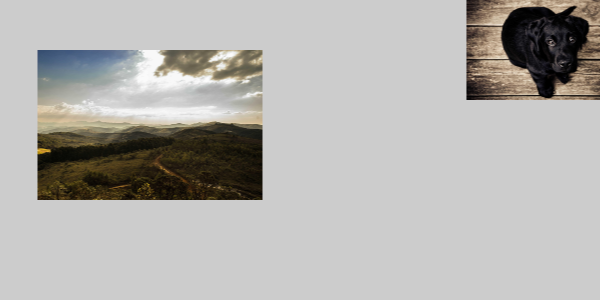
{
  "type": "image",
  "config": {
    "width": 600,
    "height": 300,
    "backgroundColor": "#CCCCCC",
    "layers": [
      {
        "type": "image",
        "path": "/image/2025-09-10/cmejsz/landscape.jpg",
        "x": 50, "y": 50,
        "width": 200, "height": 150,
        "fit": "cover"
      },
      {
        "type": "image",
        "path": "/image/2000-09-10/cmejsz/dog.jpg",
        "position": "top-right",
        "width": 100, "height": 100,
        "fit": "cover"
      }
    ]
  }
}
Positioning with Transformations
Combine positioning with rotation and other effects:
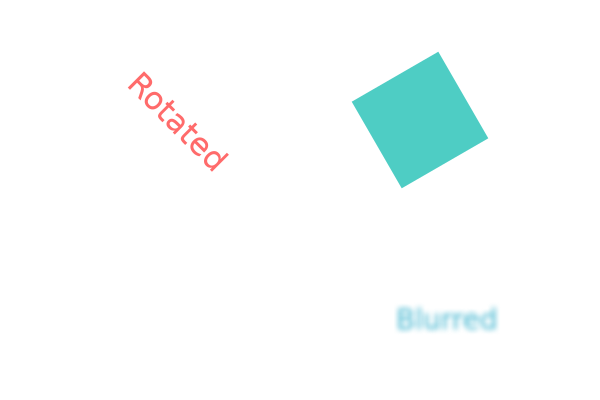
{
  "type": "image",
  "config": {
    "width": 600,
    "height": 400,
    "backgroundColor": "#ffffff",
    "layers": [
      {
        "type": "text",
        "text": "Rotated",
        "position": { "x": 0.3, "y": 0.3, "originX": "center", "originY": "center" },
        "fontSize": 32, "color": "#ff6b6b",
        "rotation": 45
      },
      {
        "type": "rectangle",
        "position": { "x": 0.7, "y": 0.3, "originX": "center", "originY": "center" },
        "width": 100, "height": 100,
        "fill": "#4ecdc4",
        "rotation": -30
      },
      {
        "type": "text",
        "text": "Blurred",
        "position": { "x": 0.5, "y": 0.7, "originX": "center", "originY": "center" },
        "fontSize": 28, "color": "#45b7d1",
        "blur": 3
      }
    ]
  }
}
Common Mistakes
Avoid These Patterns
❌ Hardcoded positions for different canvas sizes
// Don't do this for responsive designs
{ "x": 400, "y": 300 }
✅ Use relative positioning instead
{ "position": { "x": 0.5, "y": 0.5, "originX": "center", "originY": "center" } }
❌ Ignoring origin points
// This might not align as expected
{ "position": "center", "originX": "left" }
✅ Match origin to intention
{ "position": "center", "originX": "center", "originY": "center" }
Next Steps
- Text Rendering - Learn about text-specific positioning and alignment
- Visual Effects - Combine positioning with visual effects
- Examples - See positioning in real-world layouts